Processing Reports

Processing Report section allows to configure the XML reports generated by KillDisk Industrial after operation is complete.

KillDisk Industrial gives you the option to store XML reports for any major operation it performs (Disk Erase, Secure Erase, Examine Disk Physical Integrity, Disk Clone and Disk Wipe) on a disk.

Configure Processing Report preferences page in order to get XML reports generated and saved to particular location.

These reports may include detailed information regarding erase processes, such as:

Company Information
  • Name
  • License
  • Location
  • Phone
  • Disclaimer
Technician Information
  • Name
  • Comments
System & Hardware Info
  • OS version
  • Architecture
  • Kernel
  • Processors
  • Manufacturer
Erase Attributes
  • Erase Verify
  • Passes
  • Method
  • Verification Passes
Error Handling Attributes
  • Errors Terminate
  • Skip Interval
  • Number of Retries
  • Source Lock
  • Ignore Write Error
  • Ignore Read Error
  • Ignore Lock Error
Disks
  • Device Size
  • Device Type
  • Serial Number
  • Revision
  • Product Number
  • Name
  • Geometric Information
  • Partitioning Scheme
Batches
  • Name
  • Disks
  • Time
Additional Attributes
  • Fingerprint Information
  • Initialization
Erase Result
  • Bay
  • Time and Date Started
  • Disk Information
  • Status
  • Result
  • Time Elapsed
  • Errors
  • Name of Operation

This reports, as structured source could be used for import, indexing and overall organize processing history.
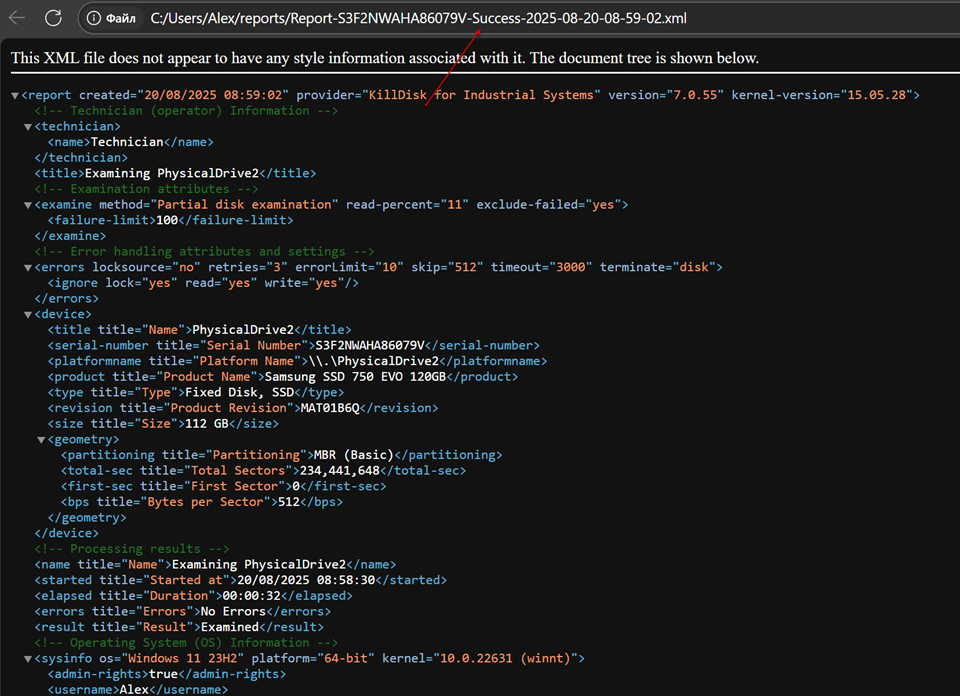
Figure 1: XML Report Sample